November 15, 2026
How to Check Domain Reputation Before Your Emails Bounce
You opened the laptop on Monday, sent a normal batch, and half the replies never came. The other half landed in spam. Someone on the team says the domain is fine because a blacklist scan came back clean. That scan answered one question. It did not tell you which signal is failing.
Learning how to check domain reputation means reading those signals separately. Gmail, Outlook.com, and public blocklists do not share one score. A domain can authenticate and still get filtered. A shared IP can drag a careful sender down. The audit below tells you which layer to fix before the next send.
Table of Contents
- Numbers and Volume Rules to Know First
- Tools That Answer Each Check
- How to Run the Audit, Step by Step
- Reading Gmail Postmaster Tools Without Fooling Yourself
- Blocklists Are One Layer, Not the Verdict
- Matching Symptoms to the Signal That Is Failing
- Set a Weekly Check Before Your Next Campaign
Numbers and Volume Rules to Know First
Domain reputation is not a single grade you can look up. Mailbox providers read spam complaints, authentication, and listing status as separate rows. Pull these five for your main sending domain before you touch a campaign.
| Signal | Where to check | Healthy | Watch | Act now |
|---|---|---|---|---|
| Gmail spam rate | Google Postmaster Tools | Below 0.1% | 0.1% to below 0.3% | 0.3% or higher |
| Gmail Domain Reputation | Google Postmaster Tools | High | Medium | Low or Bad |
| SPF, DKIM and DMARC alignment | Headers of a test email | All pass and align with From domain | One check fails or alignment is off | Two or more fail or DMARC missing |
| Spamhaus DBL listing | Spamhaus DBL lookup for each domain | Not listed | Newly listed, category still unknown | Listed |
| Outlook.com high-volume rules | Daily messages to Outlook.com consumer addresses | Under 5,000 per day | 5,000 or more with SPF and DKIM passing but DMARC or alignment unconfirmed | 5,000 or more with SPF or DKIM failing or DMARC missing |
Medium is not a clean bill of health. Google treats it as a legitimate history with occasional spam, and delivery can slip as soon as complaints rise.
Volume decides which rules bind you
Google treats a sender as bulk when it sends close to 5,000 or more messages to personal Gmail accounts in 24 hours, and messages from the same primary domain count together, according to Google's bulk sender definition. Mail to Google Workspace accounts does not count toward that line. Enforcement against non-compliant traffic began ramping up in November 2025, and it can mean temporary or permanent rejection.
Outlook.com uses its own cutoff. Microsoft's high-volume sender requirements, announced on April 2, 2025, say domains sending more than 5,000 messages a day to Outlook.com consumer addresses must pass SPF and DKIM, publish DMARC at least at p=none, and align SPF or DKIM with the visible From domain. Beginning May 5, 2025, non-compliant messages were routed to Junk first, and unresolved problems can lead to rejection.
A clean blocklist row answers a different question from a spam-rate row. Compare your own numbers with delivery rate benchmarks by mailbox provider so a "fine" day is not just a quiet day. If you are unsure whether tomorrow's send crosses a threshold, the outbound volume planner splits daily volume by provider before you hit send.
Write down today's volume by provider and destination type. Mark every row that sits in Watch. That mark is the only number that should change your send plan this week.
Tools That Answer Each Check
Each tool answers one question. Using the wrong one is how teams declare a domain healthy and then watch mail vanish.
| Tool | What it reports | Scope | Run it on |
|---|---|---|---|
| Google Postmaster Tools | Spam rate, Domain Reputation, delivery errors | Gmail view of verified domains | Each sending domain and subdomain |
| Microsoft SNDS | Complaint rates and spam-trap activity | Sending IP addresses | Each sending IP |
| Spamhaus DBL lookup | Listing status and category | Domains and hosts only | Every hostname, including tracking and redirect domains |
| Public IP blocklists | Listing status | Sending IP addresses | Each sending IP |
| Test-message headers | DKIM and DMARC results and alignment | One message | Each sending stream |
| DNS TXT lookup | Published SPF and DMARC records | Hostname | Root and outbound subdomains |
Postmaster Tools is Gmail's view of a verified domain, and the spam-rate figure updates daily. SNDS is about the IP, including complaints and spam traps, not the domain name on the envelope. Spamhaus DBL covers domains and hosts tied to phishing, spam, malware, botnet command-and-control, and redirectors. It is not an IP list. Querying an address there wastes the check.
Run DNS and DBL on every hostname, headers on each sending stream, and Postmaster plus SNDS for the trend. A quick pass through the email deliverability checker shows whether SPF, DKIM, DMARC, and MX are even published before you open a dashboard. Read the six results together. One green cell is not a verdict.
How to Run the Audit, Step by Step
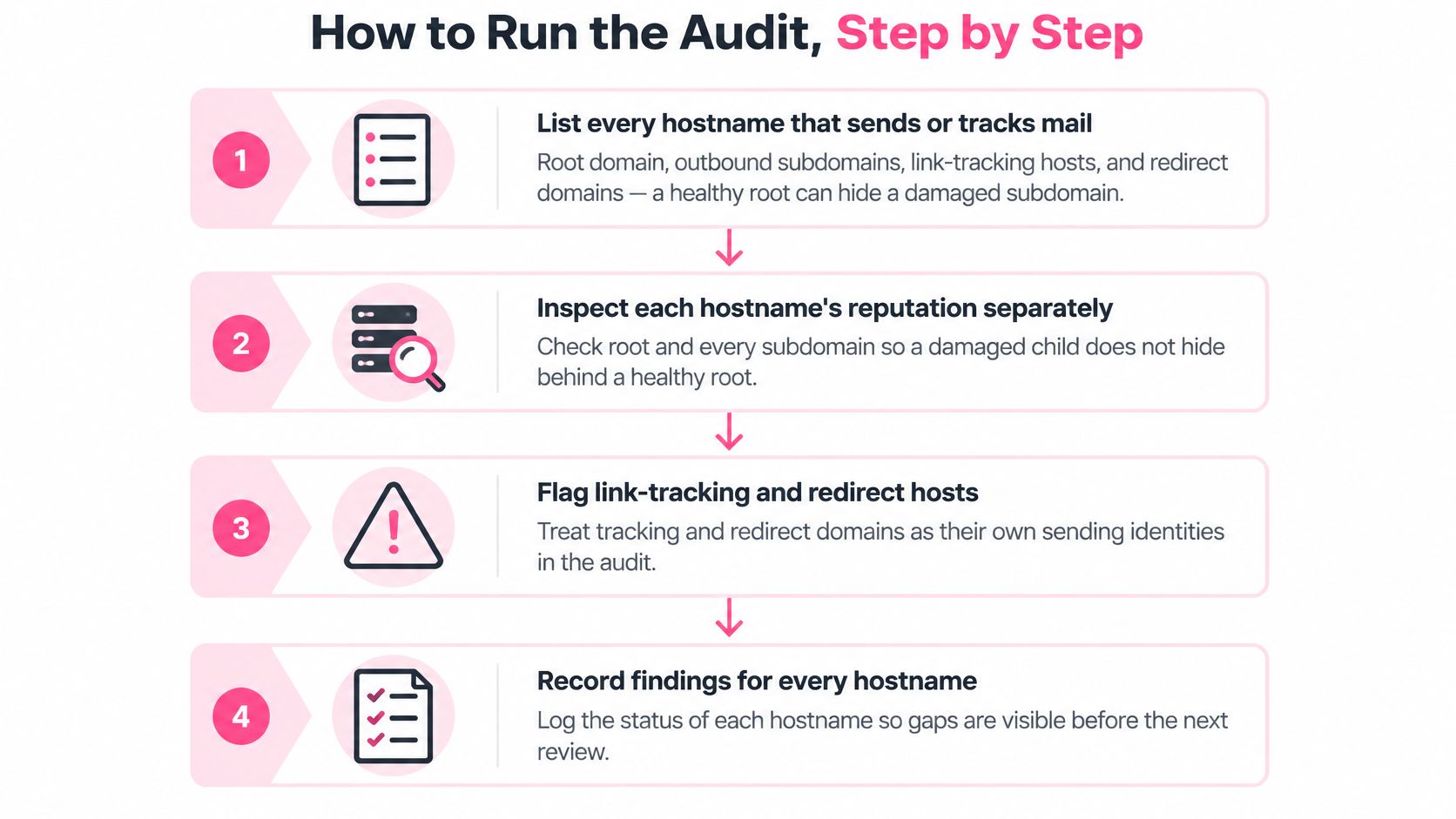
Treat this as a Monday checklist. Each step exists because the previous one can lie by omission.
- List every hostname that sends or tracks mail. Write the root domain, each outbound subdomain, every link-tracking host, and every redirect domain. A healthy root can sit in front of a damaged child, and providers judge the host the recipient sees.
- Verify each sending domain in Google Postmaster Tools. You need spam rate, Domain Reputation, and delivery errors for that exact domain. Without verification the dashboard stays empty, which looks like a quiet week and is not.
- Send one test from each stream and read the headers. Confirm DKIM passed and DMARC aligned the authenticated domain with the visible From domain. A published record that does not match the From domain still fails the check that Gmail and Outlook.com apply at volume.
- Query each hostname on Spamhaus DBL. DBL is for domains and hosts, not IP addresses. Note whether the name is newly listed and which category the listing uses.
- Check the sending IP on its own lists. Use IP-oriented blocklists plus Microsoft SNDS for complaint and spam-trap activity on addresses you are allowed to view. A shared pool can import someone else's history onto your mail.
- Keep an evidence log. Record timestamp, resolver, queried hostname, DNS result, authentication headers, provider reputation, complaint rate, and the remediation you took. A one-off scare becomes a trend you can act on only when those fields exist for more than one week.
- Repeat after every launch, DNS change, or new mailbox, and at least weekly. A new tracking host is a new identity. Waiting for a bounce to tell you it failed is how a Thursday spike becomes a lost week.
Practical rule: If a hostname is not in the log, it has not been checked.
If the header step keeps failing on copy rather than DNS, run the message through the cold email grader before you blame the domain. Fix the layer the log names, then run that same check again. Do not "fix" a clean IP because a subdomain got listed.
Reading Gmail Postmaster Tools Without Fooling Yourself
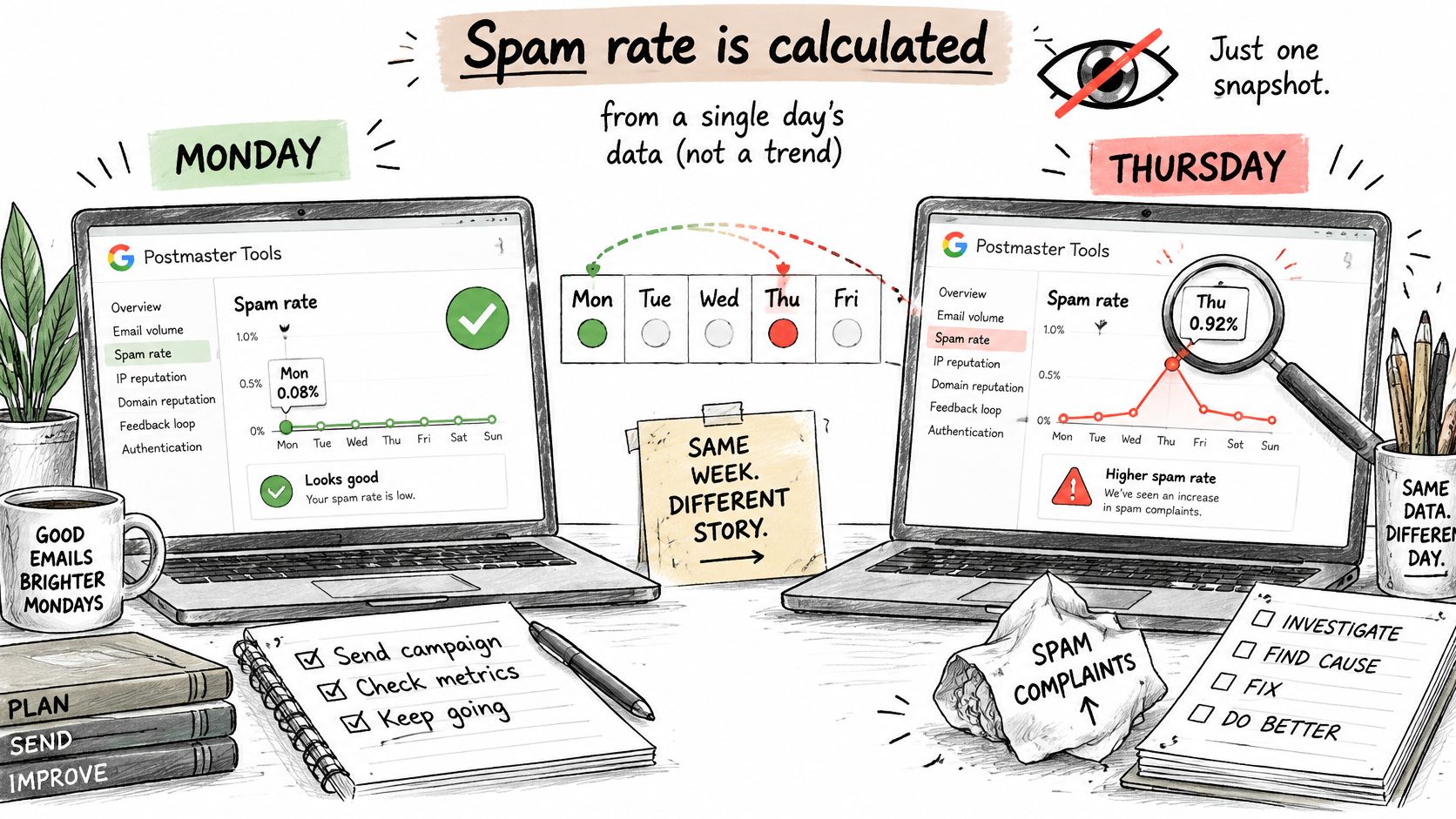
Say the dashboard looked calm on Monday. On Thursday the complaint line jumped, and nobody noticed because the team screenshotted one day. Spam-rate data is calculated and updated daily, so a single green reading is a snapshot, not a trend.
Google's sender guidelines have required authentication and behavior standards for mail to Gmail accounts since February 1, 2024. Google tells senders to use Postmaster Tools for domain and IP reputation, spam rates, and delivery errors. Keep user-reported spam below 0.1%. Rates above 0.1% can hurt inbox delivery, and 0.3% or higher hits harder. Cross 0.3% and you may lose delivery mitigations until the rate stays under 0.3% for seven consecutive days.
Three ways the chart lies
Averaging hides the bad child. A healthy primary domain plus a wrecked outbound subdomain can average into something that looks acceptable. Segment by sending domain, DKIM domain, IP pool, and mailbox provider. A shared IP can also add reputation that has nothing to do with your domain.
Medium is a warning, not a pass. Google describes Medium as legitimate history with occasional spam. Deliverability can deteriorate when spam increases. I would not raise volume on a Medium domain.
Seed inboxes are not your audience. A seed test can show a message in a controlled inbox while real recipients are hitting spam. Use seeds as a diagnostic. Complaint data from actual recipients is the number Postmaster Tools is counting.
A sudden rise in complaints, delivery errors, or rate limiting means later messages may be filtered, throttled, or rejected. Segment the view, watch the climb, and pause the affected stream before you add volume. Seven quiet days beat one heroic send.
Blocklists Are One Layer, Not the Verdict
The usual trap is a clean scan and a sigh of relief. Campaign metrics look fine, so the team assumes the inbox is fine too. Reputation can still be hurt by spam, phishing, malware, hijacked infrastructure, or a neighbor you did not choose.
Spamhaus describes the Domain Blocklist, or DBL, as a DNS-based list of domain names with poor reputation. It covers domains and hosts tied to phishing, spam, malware, botnet command-and-control activity, and redirectors. Spamhaus analyzes billions of signals each day from a global sensor network and third-party data. Its published statistics are a snapshot of the preceding 30 days, not a census of the internet.
A clean result does not guarantee inbox placement. Mailbox providers also weigh complaints, authentication, engagement, and how steadily you send. A listing is a serious risk signal, not a footnote. A fresh listing usually means something changed recently in your sending or in an account that can send as you.
What to do when a name is listed
- Pause the affected infrastructure. Stop that hostname and any IP that only that stream uses.
- Identify the category. Phishing, malware, spam, and redirectors point at different fixes.
- Audit links, credentials, and accounts. Look for compromised logins and unexpected redirects before you touch DNS.
- Request delisting only after the cause is fixed. A removal with the same behavior still in place comes back.
Pair every blocklist result with authentication results and complaint data before you decide the next send. A listing without a complaint spike is still a stop. A complaint spike without a listing is still a stop. Neither one clears the other.
Matching Symptoms to the Signal That Is Failing
The useful question is which signal is failing. DNS can look perfect while mail still lands in spam, because complaint history and IP history are different layers from a TXT record.
Postmaster Tools shows how Gmail sees a verified domain. SNDS focuses on sending IPs, complaints, and spam traps. Public blocklists show listing status. None of them proves inbox placement on its own.
| Symptom | Likely cause | Check next | What it cannot prove |
|---|---|---|---|
| Mail lands in spam but DNS records look correct | Complaint rate or weak sending IP history | Gmail spam rate by domain, then sending IP history | Inbox placement, since DNS can pass while complaints fail |
| Hard bounces climb after a send | Poor list quality or invalid addresses | Bounce rate by campaign and list source | Domain trust with mailbox providers |
| Authentication failures in test headers | Missing DKIM or From domain not aligned | SPF, DKIM and DMARC results on a fresh test message | Complaint behaviour from recipients |
| Domain appears on a blocklist | Spam, phishing, malware or a compromised account | DBL lookup plus a link and credential audit | Whether mailbox providers have already filtered you |
| Domain Reputation drops from High to Medium | Rising complaints from targeting or frequency | Seven-day trend, not one day | Permanent damage to the domain |
| Outlook.com routes mail to Junk | Failing SPF or DKIM, or missing DMARC at volume | Outlook authentication results and DMARC policy | Gmail placement, which needs its own check |
Cloudflare's analysis of mail it processed found that 89% of unwanted messages passed at least one SPF, DKIM, or DMARC check between May 2022 and May 2023. Authentication is necessary. It is not trust.
Two cases that look the same in the inbox
A team has clean SPF, DKIM, and DMARC. Mail still hits spam. The shared IP carries old complaint history, and SNDS shows trap hits the domain dashboards never mention. Moving the stream to a clean, dedicated address fixes that layer. Rewriting the DNS again does not.
The reverse is a quiet IP and a bad list. One imported file full of stale addresses drives hard bounces and a complaint climb, while blocklists stay empty. Clean the source before you touch infrastructure. The lead list cleaner is the check that matches that symptom.
Fix the layer the symptom names. Recheck that same signal for seven days before you call it solved. A one-day recovery is not a recovery.
Set a Weekly Check Before Your Next Campaign
You can run this yourself, or you can hand the monitoring to a team that lives in it. I would keep the weekly pass in-house until the log is boring, then decide.
Each week, review the Postmaster spam-rate and Domain Reputation trend for every sending domain. Run the DBL lookup and the IP checks. Confirm authentication on a fresh test message. Update the evidence log with the same fields you used on day one. Pause any stream whose spam rate is climbing toward the enforcement line until the list, the targeting, or the frequency is fixed. Adding volume on a rising complaint line is how a Watch row becomes a rejection.
If your team does not have the hours, we can take the sending. We're pay-per-close, so we earn only when you close a deal. We verify decision makers before a single email goes out, write short specific copy on warmed domains so messages can reach the inbox, and book interested prospects onto your calendar. Domain setup, warmup, and deliverability monitoring sit inside that work, not as a separate retainer you pay whether mail lands or not.
Start this week with one action. Open Postmaster Tools for your busiest sending domain, write today's spam rate and Domain Reputation in the log, and do not increase that stream until both sit in the healthy column.
Ever Outbound Inc. runs done-for-you B2B outreach for teams that would rather close deals than babysit sender reputation, with domain setup, warmup, and monitoring built into the sending. You pay when a deal closes, and the first two closes are commission-free. If you want that workload off your Monday list, visit Ever Outbound Inc..