October 29, 2026
Email Deliverability Check: A Practical Audit
The usual advice is to run an email deliverability check, fix the red marks, and start sending. That's how you end up celebrating a dashboard while staring at an empty calendar.
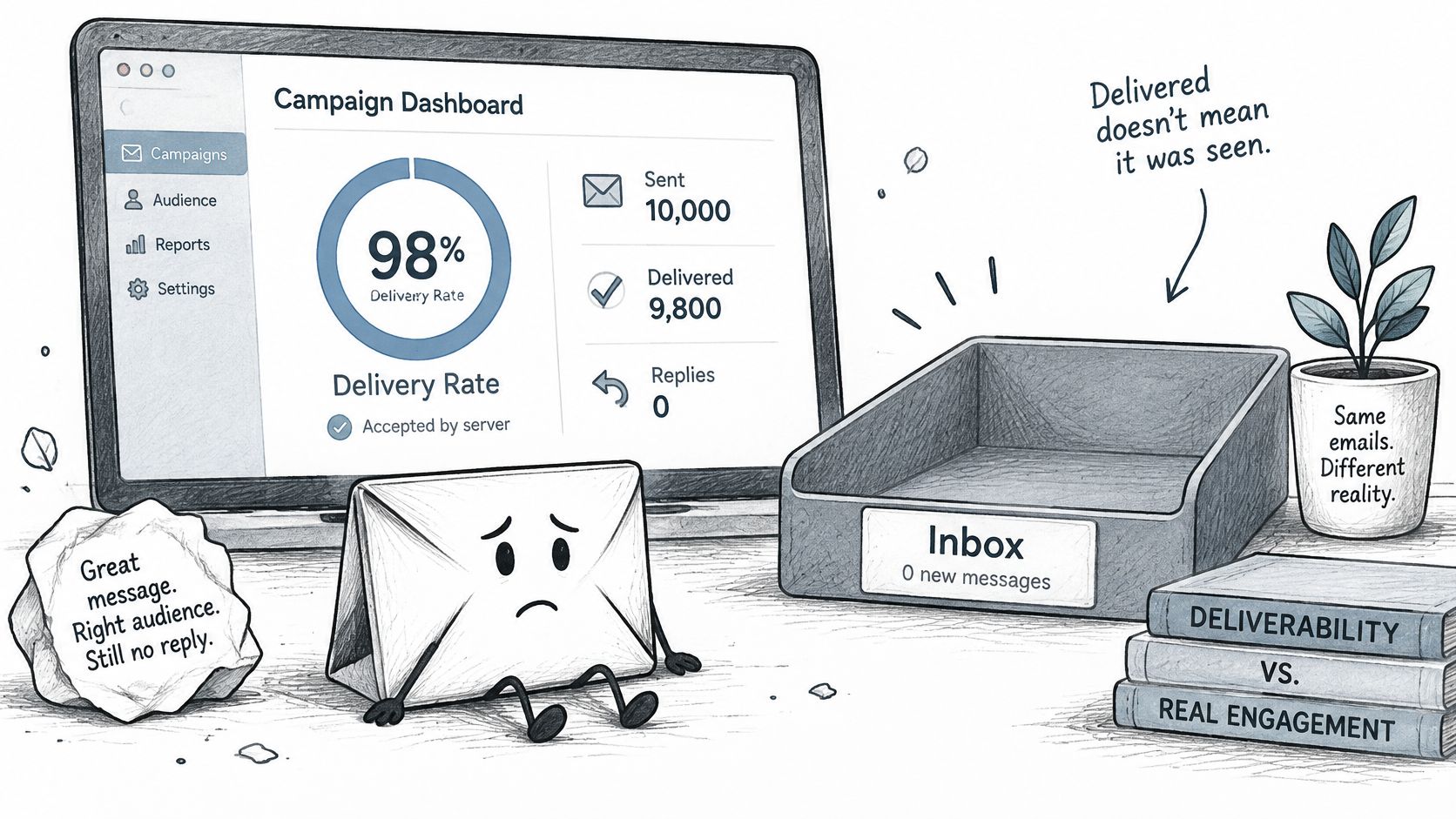
Say your cold campaign reports a 98% delivery rate, but nobody books. That's a hypothetical dashboard, not proof your prospects saw the pitch. Before rewriting the subject line, find out what your platform means by delivered.
Table of Contents
- Why a Green Check Still Misses the Inbox
- Pass and Fail Lines for a Real Deliverability Check
- How to Audit SPF DKIM and DMARC
- Seed Tests Across Gmail Microsoft Yahoo and Apple
- Spam Signals and Diagnostic Tools
- Warmup Volume and the Habits That Break a Pass
- Fix the Infrastructure or Hand Off Sending
Why a Green Check Still Misses the Inbox
A receiving server can accept your message without putting it where a prospect will notice it. Your sequencer records success, your sales rep waits for replies, and the recipient never sees the offer.
Keep these outcomes separate:
- Accepted by the server: The receiving system took responsibility for the message.
- Delivered somewhere in the mailbox: The message reached a folder or mailbox location, potentially including spam.
- Placed in the primary inbox: The message reached the main inbox view where you intended the conversation to begin.
The dashboard-to-inbox gap looks like this:
A Technical Pass Answers a Smaller Question
Authentication lets the receiving provider verify who's authorized to send. It doesn't establish that recipients want the message, trust the sender, or will engage with the offer.
In its Gmail placement assessment, the Unspam email deliverability benchmark report found that 60% of messages reached a visible mailbox location, 36% went to spam, and 4% were blocked before delivery. Those are outcomes a clean DNS badge can't describe.
Gmail's Promotions and Updates tabs add another wrinkle. A message can count as delivered without appearing in Primary, and a prospect who rarely checks those tabs may never notice your outreach. That's not the same failure as rejection, but it still matters to the person responsible for booking meetings.
A green authentication badge proves something about sender identity. It proves nothing about whether a buyer saw your pitch.
Don't Rewrite an Invisible Sequence
Say an agency sends a relevant offer to operations directors. The team swaps the opening sentence, changes the call to action, and adds another follow-up, while every test message keeps landing in spam.
They're editing the wrong layer.
Use an email sequence generator to organize a conversation, not to diagnose its route through a receiving provider. Copy development and placement testing solve different problems.
Before touching either, label your current report accurately. Does it measure server acceptance, arrival somewhere in the mailbox, or primary-inbox placement? If the platform doesn't say, your first audit task is getting that answer.
Pass and Fail Lines for a Real Deliverability Check
Mark the scorecard before opening another testing tool. An unknown result isn't a pass, and an authentication badge doesn't cancel a broken unsubscribe path.
Email deliverability check pass and fail lines
| Check | Pass | Fail |
|---|---|---|
| SPF record | One TXT record authorizing every real sender and at most 10 DNS lookups | Two SPF records or more than 10 lookups |
| DKIM signature | Selector public key verifies and the signing domain stays stable | Missing selector, broken key, or an unsigned sending tool |
| DMARC and alignment | Policy published and visible From matches the SPF or DKIM domain | No record, or a pass that does not align |
| Spam complaint rate | Below 0.1 percent | 0.3 percent or higher |
| Unsubscribe path | Opt-out works for 30 days and is honored within 10 business days | Dead link or opted-out addresses still mailed |
| Reverse DNS and blocklists | PTR matches the sending host and major lists are clean | Generic rDNS or a listed IP |
Treat the DMARC match in this scorecard as alignment under the applicable policy, not necessarily an identical hostname. For reverse DNS, investigate generic or mismatched hostnames with whoever controls the sending IP rather than changing unrelated domain records.
Complaints Are a Stop Signal
Google's sender guidance advises keeping spam rates below 0.1%, avoiding 0.3% or higher, and says bulk senders may become eligible for mitigation after remaining below 0.3% for seven consecutive days.
That last condition isn't a promise of restored inbox placement. It concerns mitigation eligibility, and sending more mail while waiting isn't a recovery strategy.
The space between the scorecard's complaint pass and fail lines is a warning zone, not spare capacity. Review which audience, mailbox, and campaign produced the increase. Don't hide a troubled stream inside an account-wide average.
Test the Exit Like a Recipient
For commercial email to U.S. recipients, the FTC's CAN-SPAM compliance guide requires an opt-out mechanism that works for at least 30 days after sending, fulfillment within 10 business days, accurate headers, a nondeceptive subject line, and a valid physical postal address.
Click the unsubscribe link from an actual received message. Then check whether the address appears on the suppression list and stays excluded when someone imports a fresh prospect file.
A successful confirmation page isn't enough. The important event happens in the sending system: that recipient stops receiving commercial outreach.
- Trace suppression: Check the sequencer, CRM, and any separate campaign platform.
- Inspect imports: Make sure a new list can't reactivate an opted-out contact.
- Remove obvious waste: Use a lead list cleaner before loading prospects, while keeping suppression enforcement separate from address cleanup.
Fail the domain's readiness assessment if any red-flag cell is true. That doesn't mean the domain is permanently unusable; it means nobody should increase sending until the owner fixes the failed control and supplies evidence.
Assign each row a named owner. Otherwise, marketing assumes IT handles it, IT assumes the sending platform handles it, and the campaign goes out with everyone technically uninvolved.
How to Audit SPF DKIM and DMARC
Run the identity audit before anyone scores the copy. Start with an inventory of actual sending services, not the services someone remembers buying.
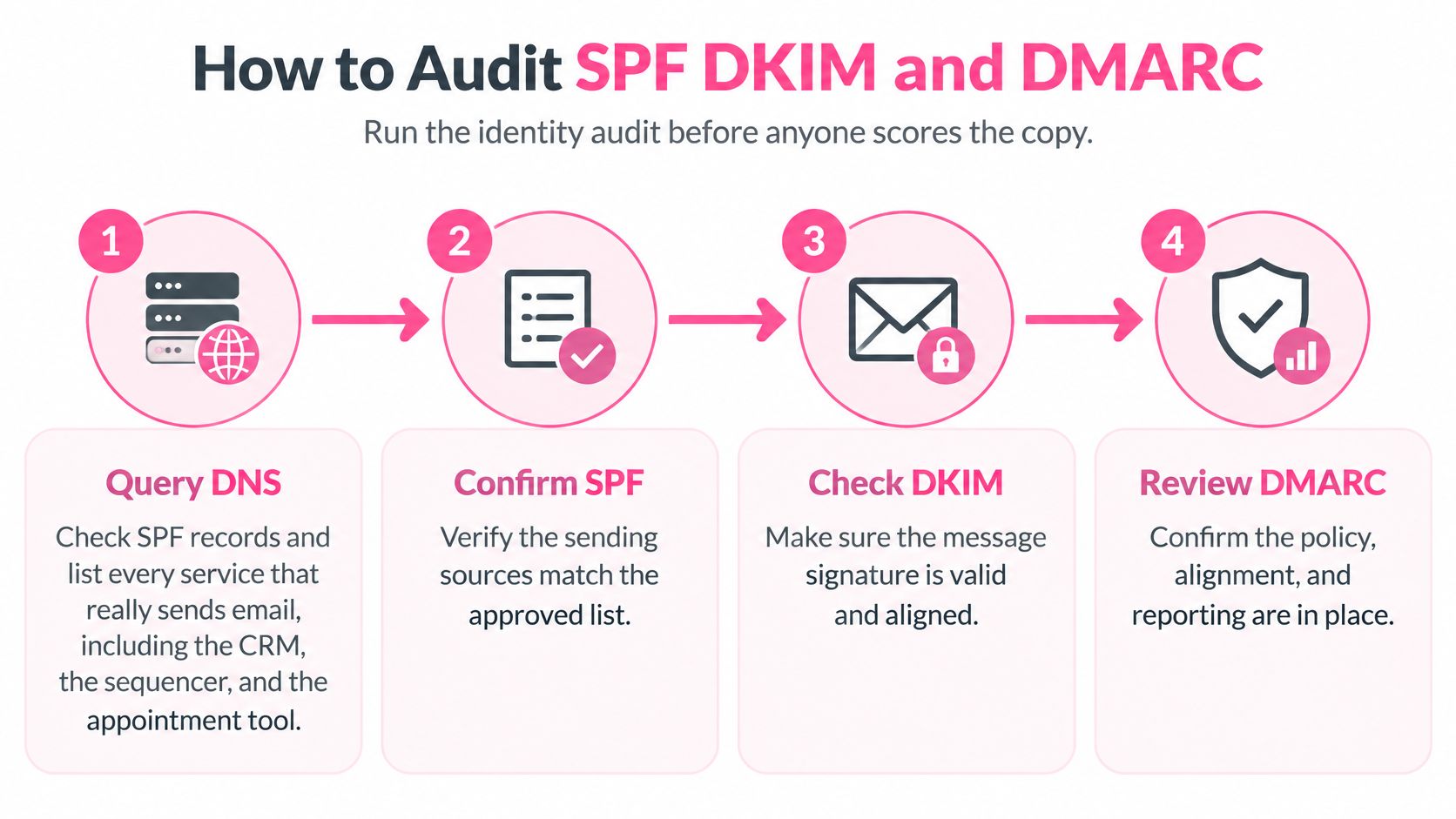
Keep this audit path beside the mailbox inventory:
Follow the Message Through Its Identity Checks
Query DNS and inventory SPF senders. List the CRM, sequencer, appointment tool, support platform, and anything else that sends using your domain. Use a DNS lookup tool to inspect the published SPF record, then trace included services rather than counting only what's visible in the first result.
Google's authentication guidance describes SPF's 10-DNS-lookup evaluation limit and requires bulk senders to configure both SPF and DKIM, while DMARC can pass when either mechanism authenticates and aligns.
Multiple SPF records are a common failure. So is an old vendor include that nobody uses but everybody is afraid to remove. Confirm ownership before changing it.
Verify DKIM on a real message. Retrieve the public key for the selector shown in the message signature and confirm verification succeeds. Check that the signing domain stays stable across messages from the same intended stream.
A missing selector can leave a perfectly ordinary message unverifiable. A third-party platform may also sign with its own domain, which can produce a signature pass without the alignment you expected.
Publish DMARC and read the reports. If the record is missing, establish reporting before tightening enforcement. Aggregate reports help distinguish unauthorized sources from legitimate tools that were never configured properly.
Say the sequencer looks healthy, but appointment confirmations fail. Blocking everything immediately would turn a security improvement into missing meeting reminders. Identify and repair that source first.
Validate alignment on each stream. Compare the visible From domain with the SPF-authenticated domain and the DKIM signing domain. A misconfigured return path can make SPF authenticate a different identity than the sender intended.
Forwarding can disrupt SPF because the forwarding server becomes the connecting sender. Inspect the actual received result rather than assuming the original sending configuration survived every hop.
Audit Mailboxes, Not Just Domains
A new subdomain, mailbox, or automation tool needs its own evidence. Domain-level records don't prove that every connected application uses them correctly.
Keep a worksheet with the mailbox, sending service, selector, authenticated identities, alignment result, and person responsible for repairs. Give each sending stream a pass or fail, with the received test message attached.
For a practical explanation alongside the worksheet, use this walkthrough:
Start DMARC in monitoring mode, resolve legitimate failures, and move toward quarantine or rejection only when the reports support it. A record that exists isn't automatically a policy that's safe to enforce.
For teams that also send membership login messages, VeloCMS's magic link help for membership sites is useful adjacent troubleshooting. A login email sent through a different platform deserves its own stream-level investigation, even when outbound mail from the same organization works.
Practical rule: Don't approve a domain with a shrug. Approve the specific mailboxes and sending paths you actually tested.
Seed Tests Across Gmail Microsoft Yahoo and Apple
Inbox spam and missing rates by provider
Validity's 2025 benchmark, as summarized by Brevo's email marketing benchmarks, reports the following provider placement rates and regional inbox placement of 85.0% in North America, 89.1% in Europe, 78.1% in Asia, and 77.4% in South America.
| Destination | Inbox | Spam | Missing or neither |
|---|---|---|---|
| Gmail | 87.2% | 6.8% | 6.0% |
| Microsoft | 75.6% | 14.6% | 9.8% |
| Yahoo | 86.0% | 4.8% | 9.2% |
| Apple | 76.3% | 14.3% | 9.4% |
These are reference points, not your campaign's predicted results or a passing grade. Different providers can handle the same sender differently, and regional variation gives you another reason to test destinations representative of your audience.
Treat SMTP acceptance as the starting gun, not the result. Build a test panel that can reveal where the message went.
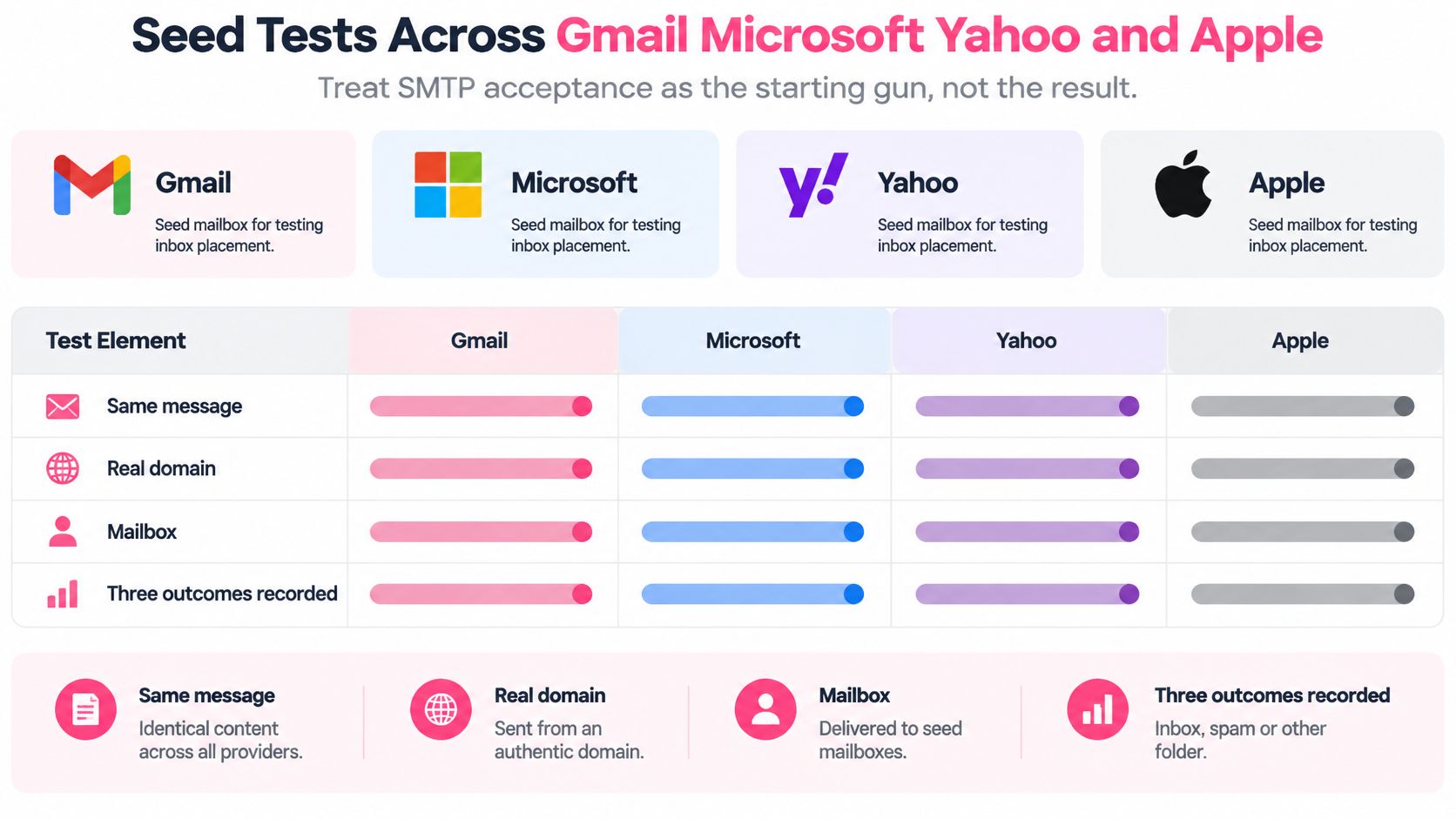
Use this provider spread when setting up the panel:
Send the Campaign You Actually Intend to Run
Use several seed mailboxes per provider. Send from the production mailbox through the production sending platform, with the same links, signature, formatting, and tracking settings intended for prospects.
A clean test sent manually from a different mailbox tells you little about the automated stream. You're testing the whole route, not whether the email looks nice in your own sent folder.
- Record the destination: Note the receiving provider and relevant audience region.
- Record the outcome: Keep inbox, spam, and missing separate.
- Record the tab: For Gmail, distinguish Primary from Promotions or Updates.
- Record authentication: Save the received SPF, DKIM, and DMARC results with the test.
Say Gmail places the message in Primary, Microsoft routes it to junk, Yahoo shows it in the inbox, and Apple's copy can't be found. An average health score would conceal the useful information: you have distinct provider outcomes requiring separate investigation.
Read a Received Copy Before Guessing
Open the message's original source or full headers and inspect Authentication-Results. Confirm that the result belongs to the tested sending stream, not an unrelated message from the same company.
If Microsoft seeds perform poorly while other destinations look healthy, investigate Microsoft-specific reputation, filtering, and message handling. Don't declare the domain guilty solely because a small seed panel falls below a broad benchmark, and don't assume a subject-line rewrite will fix it either.
For a missing message, check the sending log, rejection or deferral notices, spam folder, mailbox rules, and any available quarantine. Missing means you haven't located the message, not that you've identified why it disappeared.
Keep a per-send log with the provider, folder, tab, authentication result, sending mailbox, and campaign version. Preserve the original message so a later configuration change doesn't erase your evidence.
Repeat the test after DNS changes, sending-platform changes, and material volume changes. Seeds are controlled observations, not a census of every prospect's mailbox, so read them alongside real complaints, bounces, and replies.
Spam Signals and Diagnostic Tools
A spam-score tool can suggest that your message looks suspicious. It can't publish a missing DKIM key, repair a return path, or convince a recipient that an irrelevant pitch belongs in their inbox.
Run content checks after identity checks. Otherwise, you'll spend the afternoon deleting innocent words while the actual sending failure remains untouched.
Give Each Tool a Specific Job
- Header viewer: Inspect
Authentication-ResultsandReceivedon a seed copy. Confirm the DKIM body verification succeeds for the message that arrived. - DNS lookup tool: Inspect SPF records, trace included lookups, and verify the DKIM selector and DMARC reporting details.
- Reverse DNS lookup: Check the sending IP's PTR hostname and its relationship to the sending host. For hosted services, escalate infrastructure problems to the operator.
- Reputation dashboard: Use Google Postmaster Tools or the receiving provider's available reporting where your account is eligible. Missing dashboard data isn't a clean bill of health.
Check relevant blocklists such as Spamhaus, but interpret listings in context. A listing is worth investigating; it isn't a universal prediction of every provider's placement decision.
Inspect What the Recipient Receives
Review the rendered message, not just the editor preview. Look for misleading subject wording, image-heavy content, excessive links, unexpected redirects, and tracking domains that appear unrelated to the sender.
Inspect the unsubscribe headers as well as the visible footer. A footer link and a functioning one-click unsubscribe mechanism aren't interchangeable.
For merchant teams handling both promotions and transactional messages, Tagada's email authentication tips for merchants provide useful context for separating configuration problems from message-level issues. Keep those streams distinct in your testing.
Use a cold email grader to review clarity and copy signals, then compare suggested edits with actual seed placement. Don't treat its score as a receiving provider's verdict.
Maintain a tool sheet containing the tool name, check performed, date, result, and sending stream. Change a specific variable, rerun the relevant check, and save the evidence.
Warmup Volume and the Habits That Break a Pass
Friday's test looks healthy. On Monday, someone connects a fresh prospect list, removes the sending cap, and expects the same result.
New domains and mailboxes need a gradual introduction to real sending, usually planned over weeks rather than a sudden launch-day blast. Start small, hold the cadence steady, and increase only when the evidence supports it. Automated warmup activity isn't permission to send unwanted mail.
Monitoring Isn't Enforcement
Validity's 2025 benchmark report reported a 70% increase in DMARC adoption during Q1 2024, yet more than 90% of new adopters used monitoring-only p=none, and noted comparable Outlook.com bulk-sender requirements introduced in 2025.
Most new DMARC records are spectators.
Monitoring mode is useful while identifying legitimate senders. It doesn't instruct receiving providers to quarantine or reject messages that fail DMARC, although those providers can still filter messages using their own controls.
The mistake is leaving monitoring mode untouched because the checker stopped complaining. Someone still needs to review aggregate reports, investigate unexpected sources, and plan staged enforcement without breaking legitimate mail.
Inventory changes matter here. A sales rep connects an appointment tool, finance adds an invoicing platform, and customer success launches a survey. Each addition can change which systems need authorization and alignment.
Make Sending Capacity a Controlled Decision
Use an outbound volume planner to make capacity assumptions explicit. Plan around the actual warmed mailboxes available, not the size of the list somebody wants finished by Friday.
Avoid a universal daily target. Mailbox history, provider restrictions, recipient relevance, and current negative signals all affect what's sensible.
- Watch complaints: If recipients begin objecting, reduce or pause sending and inspect the targeting.
- Watch bounces: Separate invalid addresses from policy rejections and temporary failures before choosing a remedy.
- Refresh seeds: Make fresh provider tests part of the weekly operating routine, especially after changes.
- Review the message: Remove deceptive subjects, image-only pitches, confusing sender identities, and follow-ups that add nothing.
Say a recruiting firm expands from a narrow list of hiring managers to a broad database of executives. The sending infrastructure hasn't changed, but recipient expectations have. Increasing volume into that new audience can produce a very different response.
Don't warm up a mailbox carefully and then use it carelessly. Verification helps remove bad addresses; it doesn't prove that a valid recipient wants the offer.
If complaints jump, cut volume before rewriting the slogan. First establish whether you're contacting the right people with a message they can reasonably recognize as relevant.
Fix the Infrastructure or Hand Off Sending
If a mailbox fails SPF or DKIM, repair that sending stream and rerun the placement test before increasing volume. If recipients are objecting, pause the affected campaign, suppress opt-outs and clear stop requests, and reassess the audience.
When the technical gates pass and representative seeds reach the intended inbox, move your attention to list quality and the offer. An empty calendar isn't always an infrastructure problem.
Keep the Work or Assign an Owner
If your team repeatedly drops DNS upkeep, mailbox management, and warmup, assign that work to someone accountable. Our outbound operating process includes writing and sending short, specific copy on warmed domains to support inbox placement.
At Ever Outbound, we're pay-per-close, so you pay only when a deal closes from our outbound work. Email campaigns launch about 14 days after onboarding because new domains and mailboxes need warmup; LinkedIn campaigns launch within 72 hours.
We also offer free tools covering an email deliverability checker, cold email copy grader, outbound volume planner, spintax generator, cold email ROI calculator, email sequence generator, meeting cost calculator, and lead list cleaner.
- Keep sending in-house: Assign owners for DNS, suppressions, capacity, and provider testing.
- Hand off the infrastructure: Require stream-level results and visible complaint handling, not a screenshot of a green badge.
This week, score the six gates and seed Gmail and Microsoft at minimum. Then repair the failed row or stop leaving domain upkeep to whoever notices the problem first.
At Ever Outbound Inc., we're pay-per-close and provide done-for-you B2B outreach with managed domains, warmup, deliverability monitoring, human-written copy, and appointment setting. Visit us if you want a team to handle the sending infrastructure and book qualified conversations while you focus on closing them.